(HQ) UBF Daily Bread App Update: Audio Narration Service
- by ubfhq
- Jan 24, 2026
- 433 reads
By the HQ IT Team
We are pleased to announce improvements to the Daily Bread app's audio service based on your feedback.
What's New?
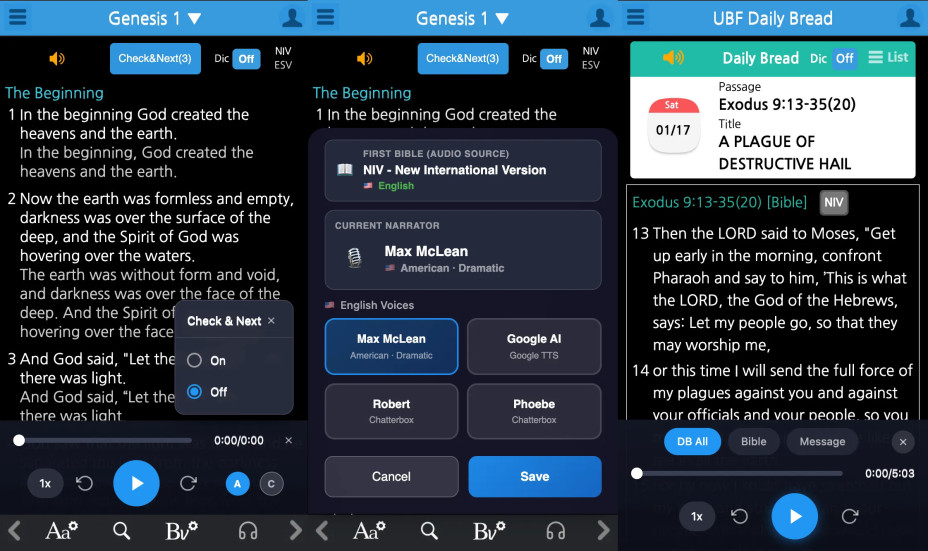
1. Larger Play Button & Streamlined Auto-Play
The audio play button is now more than twice its previous size. The auto-play feature (auto-advance to the next chapter) has been integrated directly into the reading screen for easier access. Use the A icon to toggle auto-advance and the C icon to automatically mark chapters as read.
2. Simplified Daily Bread Audio Player
We consolidated the three separate speaker icons into one. Tap the speaker icon in the top-left corner to access the audio player with three tabs: DB All (full content), Bible (Scripture only), and Message (Daily Bread message only).
3. Audio Narration for All Bible Versions
We have added AI-powered audio narration for versions that previously lacked this feature:
Korean: Korean Revised, Barun Bible, New Korean Revised
English: NIV, NLT, KJV, ESV
Spanish: RVR1960, NVI
Voice options now include Biblica (human), Google AI, Naver AI, Azure AI, and Chatterbox AI.
3. Audio Narration for All Bible Versions
We have added AI-powered audio narration for versions that previously lacked this feature:
Korean: Korean Revised, Barun Bible, New Korean Revised
English: NIV, NLT, KJV, ESV
Spanish: RVR1960, NVI
Voice options now include Biblica (human), Google AI, Naver AI, Azure AI, and Chatterbox AI.
As this was a major update, you may encounter minor issues. Please share any feedback or suggestions on the Daily Bread App Q&A board.